

Although Docker simplifies the process of creating and deploying applications, sometimes there is not enough efficiency in this process. Large images require more time to upload, download, and deploy; this way, deploying updates or running applications on different servers may become harder. The presence of unnecessary dependencies will make you pay more for storing and transmitting images, and even create some security risks. Besides, inefficient commands in your Dockerfile, and lack of resource limits in Dockerfile can cause problems for you.
Fortunately, most of these issues can be easily solved by making several simple steps. Usage of multi-stage build, minimal base images, better layer caching and .dockerignore file will save you from large images and long build process. Also, running the container as non-root user, limiting CPU and memory, and regular scanning of images will increase the security and reliability of the whole process. This article covers the **Docker best practices for high-performance applications** that will help you to make containers more effective.
Table of Contents
- Why Docker Optimization Matters
- Top Docker Best Practices for High-Performance Applications
- Quick Before & After
- Common Docker Mistakes to Avoid
- Recommended Docker Tools (2026)
- How OpsBee Technology Helps with Docker & Container Optimization
- Final Thoughts: Build Leaner Containers, Not Just Working Ones
Why Docker Optimization Matters
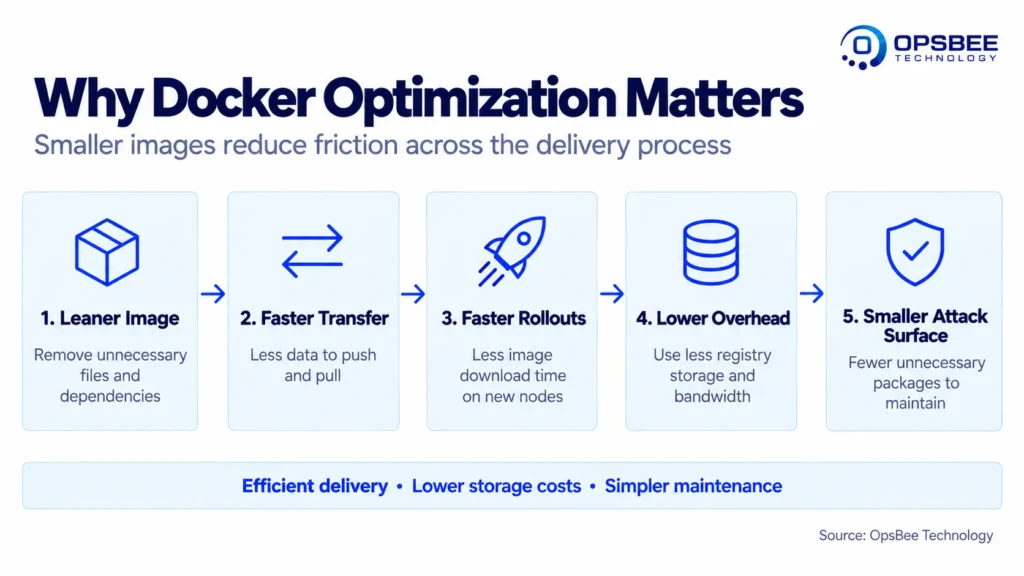
Docker made containerized app delivery much simpler, but “it works” is different from “it works efficiently.” A poorly created Docker image may be 5-10x bigger than it has to be, which impacts:
- Deployment speed
- Costs for cloud storage and bandwidth
- Container boot times
- Security attack vectors
- Efficiency of Kubernetes pod scheduling and auto-scaling because large images take longer to download when deploying to new nodes
As the table shown below demonstrates, the difference between unoptimized and optimized images can amount to a 1.4GB container vs. a 210MB container, or roughly 85% savings in size by following the steps outlined below.
Containerizing apps correctly does not mean doing everything perfectly; it means steering clear of several obvious and costly mistakes.
Top Docker Best Practices for High-Performance Applications
1. Use Multi-Stage Builds
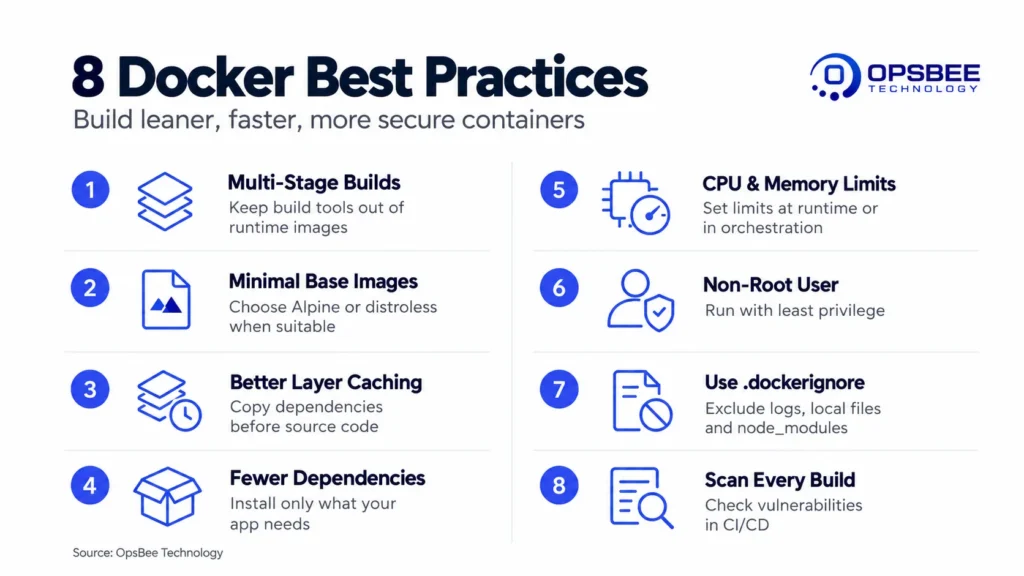
The multi-stage builds enable building or compiling of your application in one build stage, while only the artifacts that result are moved to another, more minimalist image without the unnecessary build-time tools and dependencies. This one step alone usually accounts for the majority of the reduction in size in the Dockerfile.
The only thing that goes into the resulting image is the dist folder that gets compiled. The whole node:20 development environment, sources, and devDependencies stay behind.
2. Choose Minimal Base Images
Use light versions such as alpine or distroless instead of using full OS images. In itself, this can help in reducing the size of the Docker image as well as the number of vulnerabilities from the base operating system that could have been used in the image. An Ubuntu base can contain 80 or more unnecessary packages.
3. Order Dockerfile Instructions for Better Caching
Instructions that change rarely (such as setting up dependencies) should be put first while instructions that change often (such as copying the source code) should be placed later on.
4. Avoid Installing Unnecessary Packages
More packages means more space for images and potential weaknesses in security. Always install only what the software requires.
5. Set Resource Limits
Set limitations for container CPU usage and memory, so that when one application misbehaves, it doesn’t consume all resources, thus starving other applications that share the same host.
6. Run Containers as Non-Root Users
Being in the root account while using a container is an insecure practice. Using a separate user account helps in adding a significant amount of container optimization in terms of security.
7. Use .dockerignore Properly
Exactly like .gitignore, the .dockerignore file ensures that unnecessary files such as logs, local configuration files, and node_modules do not get into the build context.
8. Scan Images Regularly
Conduct vulnerability scans of your images as part of the pipeline itself, not as something to do later. It’s much more cost-effective to solve problems before deploying.
Quick Before & After
|
Unoptimized Image |
Optimized Image |
|
|
Base Image |
Full OS (ubuntu) |
Alpine / Distroless |
|
Build Type |
Single-stage |
Multi-stage |
|
User |
Root |
Non-root |
|
Typical Size |
1–1.5 GB |
100–250 MB |
Common Docker Mistakes to Avoid
- Latest tag used for production rather than pinned versioning
- Moving the whole project directory into the image
- Neglecting the image size until it causes problems with deployment
- Skipping vulnerability scans in order to shorten the pipeline
- Failing to clean up unused images and layers
Recommended Docker Tools (2026)
The process is simplified when the appropriate tools handle some of the work for you. The following are the tools that most teams depend upon in 2026 for building, operating, and securing their containers:
|
Tool |
Purpose |
|
Docker Engine |
Core runtime for building and running containers. |
|
Docker Compose |
Simplifies multi-container application setup and management. |
|
Kubernetes |
Enterprise-grade orchestration for scaling and managing containers. |
|
Docker Scout |
Built-in image security scanning and vulnerability detection. |
|
Trivy |
Lightweight tool for container and dependency vulnerability scanning. |
How OpsBee Technology Helps with Docker & Container Optimization
Containerization is much more than writing a Docker file. Here at OpsBee Technology, we assist engineering teams to plan and optimize their container strategy so that they work effectively in real-life conditions rather than just locally.
Our related services include:
Explore our full range of services at OpsBee Technology
Final Thoughts: Build Leaner Containers, Not Just Working Ones
Docker Best Practices are not complex; they just need to be converted into habits. Multi-stage builds, minimalist base images, appropriate use of cache, and constant scans can reduce an oversized container to one that is much smaller and more secure.
It may pay to take a deeper look at your containers if they are slow, big, or difficult to manage.
Contact our experts at OpsBee Technology today to optimize your containers for real production performance.